Every recruiting search starts with the same hour of work. Open LinkedIn, search the job title, open profile after profile, decide who deserves a message, then hunt for an email address. It has to be done, it is repetitive, and it happens before any real recruiting begins.
We automated that hour. You fill in a short form with the role, location and job description. A few minutes later you have a Google Sheet of LinkedIn candidates, each with a work email where one is publicly available and a 0-100 fit score with the reasoning behind it.
This post explains how the workflow is built, what the scores look like, and where it falls short.
What the workflow does
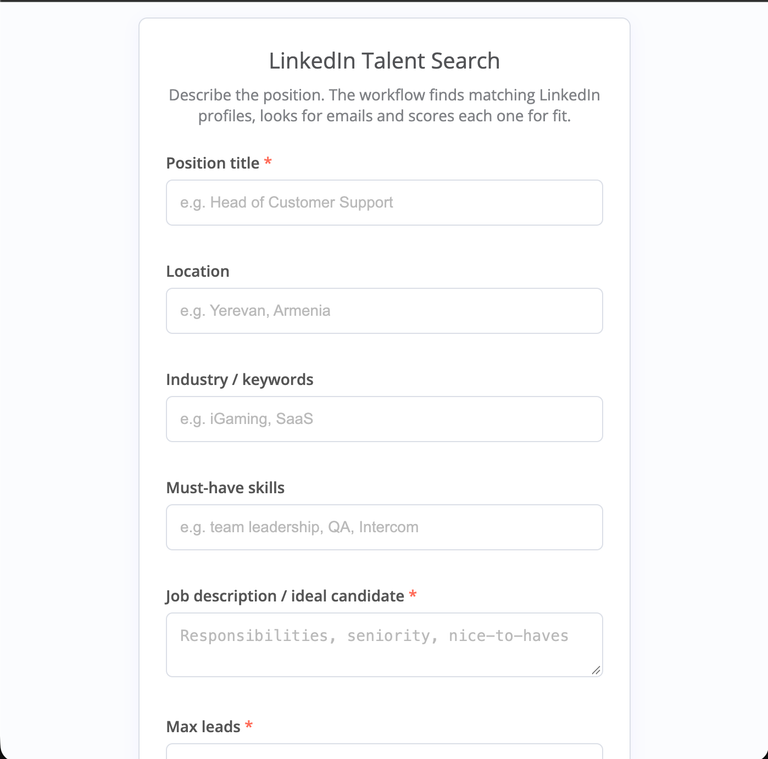
You submit one form. The workflow returns a ranked set of candidates for that role.
What you enter
- Position title and location
- Industry or keywords, and must-have skills
- The job description or a description of the ideal candidate
- How many leads you want, up to 100
What you get back
- A row per candidate in a Google Sheet: name, headline, location, current company, work email, LinkedIn URL
- A fit score from 0 to 100, with the reasoning, the strengths and the gaps
- A Telegram message when the run finishes: how many candidates were scored, how many have an email, and the top five
Every search request and every scored lead is also stored in an n8n data table, so there is a record of what was searched and what came back.
How it's built
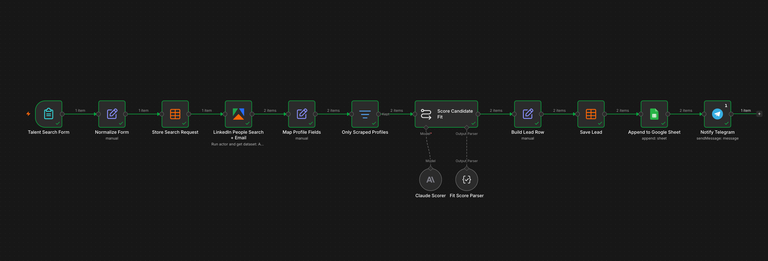
The whole thing runs as one n8n workflow, in six steps.
- Form. An n8n form collects the brief. The raw request is saved to a data table straight away, so every search is on record.
- Search. An Apify actor searches LinkedIn profiles using the job title and location as filters, in its mode that also looks up emails. Each run has a hard cost cap of $5, and a submission is limited to 100 leads.
- Clean-up. The actor's output is mapped to one consistent set of fields, and anything without a LinkedIn URL is dropped.
- Scoring. Claude reads each profile against your brief and returns a score, the reasoning, the strengths and the gaps.
- Save. Each scored lead is written to the Google Sheet and to a data table.
- Notify. A Telegram message summarises the run and lists the top five.
How the scoring works
A bare number is hard to trust, so the score always comes with its reasons. For each candidate, Claude gets your role, location, industry, must-have skills and job description, plus the person's headline, summary, experience, skills and education.
The scale is simple: 90 and above is a near-perfect match, 70 to 89 is strong, 50 to 69 is partial, and below 50 is weak. We told Claude to weigh relevant experience and seniority first, then must-have skills, then industry and location.
Two rules keep the scores believable. Claude may only use evidence that is visible in the profile, so it cannot assume a skill that is not shown. And when a profile is thin, it scores conservatively and says so in the gaps.
The output is structured: a score, a short reasoning, a list of strengths and a list of gaps. That is why each one lands in its own column in the sheet, ready to sort and filter.
What a result looks like
In our first test we searched for a Head of Support in Yerevan with a deliberately thin brief. The search returned two candidates, and both came back with an email. The scorer separated them clearly and explained why.
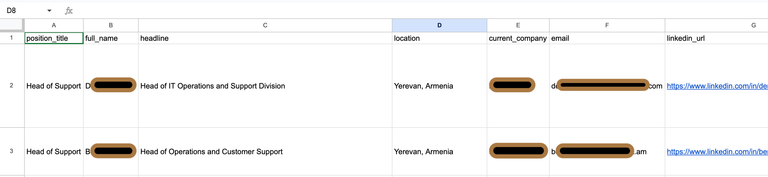
Neither candidate got a high score just for having a good-sounding title. The scorer also noted that our test brief was thin, so it could not confirm fit on the other requirements. That is the behaviour we wanted: a ranked starting point that shows its working, not a verdict.
Cost and limits
The workflow uses two paid services: Apify for the profile search and email lookup, and Claude for scoring. Apify charges per profile and Claude is called once per candidate, so a search costs far less than an afternoon of manual screening. We cap every run at $5 so a typo in the form can never turn into a surprise bill.
It also has limits you should know about:
- Emails are not guaranteed. The lookup only returns addresses that are publicly available, so some candidates will have none.
- A score is only as good as the profile. A thin profile gets a conservative score and a note saying why.
- Title searches return near-matches. Expect a few people who are close but not right, which is what the score is for.
- A person still decides. The score ranks the list. Reading the reasoning and choosing who to contact stays a human job.
- Check the rules before you reach out. Review LinkedIn's terms and the data protection rules in your market, such as GDPR, before contacting people from a list like this.
Want one for your team?
This workflow is for in-house recruiters, agencies and founders who hire often and lose the first hour of every search to manual screening. It runs from a simple form, so nobody on the team needs to know how it works underneath.
We build custom n8n workflows and AI agents for businesses, and this one can be adjusted to your hiring: different scoring criteria, different industries, different places to send the results. If you want a version for your team, get in touch at akm.am.